Google Tasks MCP Server: Every Way to Connect AI to Google Tasks
Arturo10 min read
The short answer
There is no official Google Tasks MCP server: Google's Workspace MCP servers cover eight products, and Tasks is not one of them. Every Google Tasks MCP server you can actually use is third-party, and they come in three shapes — open-source servers you run yourself with your own Google Cloud OAuth credentials, hosted platforms that run the server in their cloud and hold the grant to your Google account, and KiteTasks, a native Mac app with a local MCP server built in that reuses the sign-in you already made. This guide compares all three, lists what each exposes, and covers which AI clients can connect.
Option 1 · What exists today
The Google Tasks MCP server landscape
MCP, the Model Context Protocol, is the open standard that lets an AI client such as Claude, ChatGPT's Codex, or Cursor call tools on your behalf. An MCP server for Google Tasks is a small program that speaks that protocol on one side and the Google Tasks API on the other, so the assistant can list, create, and complete tasks. Because Google publishes no such server, the choice is between community projects on GitHub, hosted integration platforms, and a desktop app with the server built in. The differences that matter are setup time, which tools you get, and who ends up holding access to your Google account.
| Route | Setup | Tools | Who holds your Google access |
|---|---|---|---|
| Google's official Workspace MCP servers | Not available — Tasks is not among the eight supported products | None for Tasks | — |
| Open-source server you run (gtasks-mcp, mcp-googletasks, and others) | Google Cloud project, OAuth consent screen and client ID, Node.js, hand-edited config — 30 to 60 minutes | 6 to 14, depending on the project | You — the key and token files sit on your disk |
| Hosted platform (Composio, Zapier MCP) | Sign up, authorize Google, paste a server URL — about 10 minutes | Composio lists 16 tools; Zapier offers actions and triggers | The platform — its cloud keeps a standing OAuth grant to your account |
| KiteTasks built-in server | Flip one toggle in Settings, then one click or one command per client — about a minute | 11, across every Google account in the app | Only your Mac — the server reuses the app's own sign-in |
None of these routes is wrong. The open-source servers are the right pick for developers who want to read and modify the code; a hosted platform makes sense when the assistant runs in the cloud and cannot reach your machine anyway; and a local server is the fit for a personal task list on a Mac, where the whole point is that nothing new gets access to your Google account. Here is what each one actually involves.
Why there is no official Google Tasks MCP server
Google's Workspace MCP documentation lists official servers for Gmail, Drive, Docs, Sheets, Slides, Calendar, Chat, and the People API, and Google Tasks is absent from both that page and Google's open-source MCP repository. Even for the products Google does cover, the setup is developer-grade: a Google Cloud project, the gcloud command-line tool, enabling each API and its MCP variant, an OAuth consent screen, and OAuth client credentials of your own. So even if Tasks were added tomorrow, the official route would still be the longest one on the table. Until it changes, every Google Tasks MCP server is third-party.
Open-source servers: you become the developer
The GitHub projects — gtasks-mcp, mcp-googletasks, google-tasks-mcp, and a handful of forks — all share the same shape, because they all talk to the Google Tasks API directly and Google requires an OAuth client for that. You create a Cloud project, enable the Tasks API, configure a consent screen, add the tasks scope, create a Desktop App client ID, download the JSON key, drop it where the server expects it, build the server with npm, and run its auth command to sign in once in a browser. Then you register the server with your client by editing its config file by hand. The tool count varies: gtasks-mcp exposes six (search, list, create, update, delete, clear), while mcp-googletasks and google-tasks-mcp expose 13 to 14, including task-list management and move. Almost all of them authorize a single Google account per credential file, so a work-and-personal setup means two servers. Broader projects such as google_workspace_mcp bundle Tasks alongside Gmail, Calendar, and Drive, at the cost of a wider OAuth grant and a Python toolchain.
Hosted platforms: fast, and a cloud middleman
Composio and Zapier MCP both run a Google Tasks MCP server in their own cloud. You sign up, authorize Google inside their dashboard, and get a URL to paste into any client that supports remote servers — including ChatGPT's chat connectors, which cannot reach a local server at all. That is the fastest setup on the list, and the right one if your assistant is itself a cloud service. The trade is in step one: the platform now holds a refresh token for your Google account, and every task you read or write passes through its infrastructure. For a team automating a shared workspace that can be a fair deal. For a personal to-do list, it is a lot of surface area for something a desktop app can do locally.
Option 2 · Built into a Mac app
KiteTasks: a local Google Tasks MCP server, built in
KiteTasks is a native Google Tasks app for Mac, and since version 1.4.3 it ships with a local MCP server inside the app bundle. There is no Cloud project and no credential file, because the server reuses the Google sign-in you already made in the app. It is off by default, runs entirely on your Mac over the stdio transport, and talks to Google through the official Tasks API — so any MCP client that can launch a local server can use it, and nothing outside your machine gains access to your account.
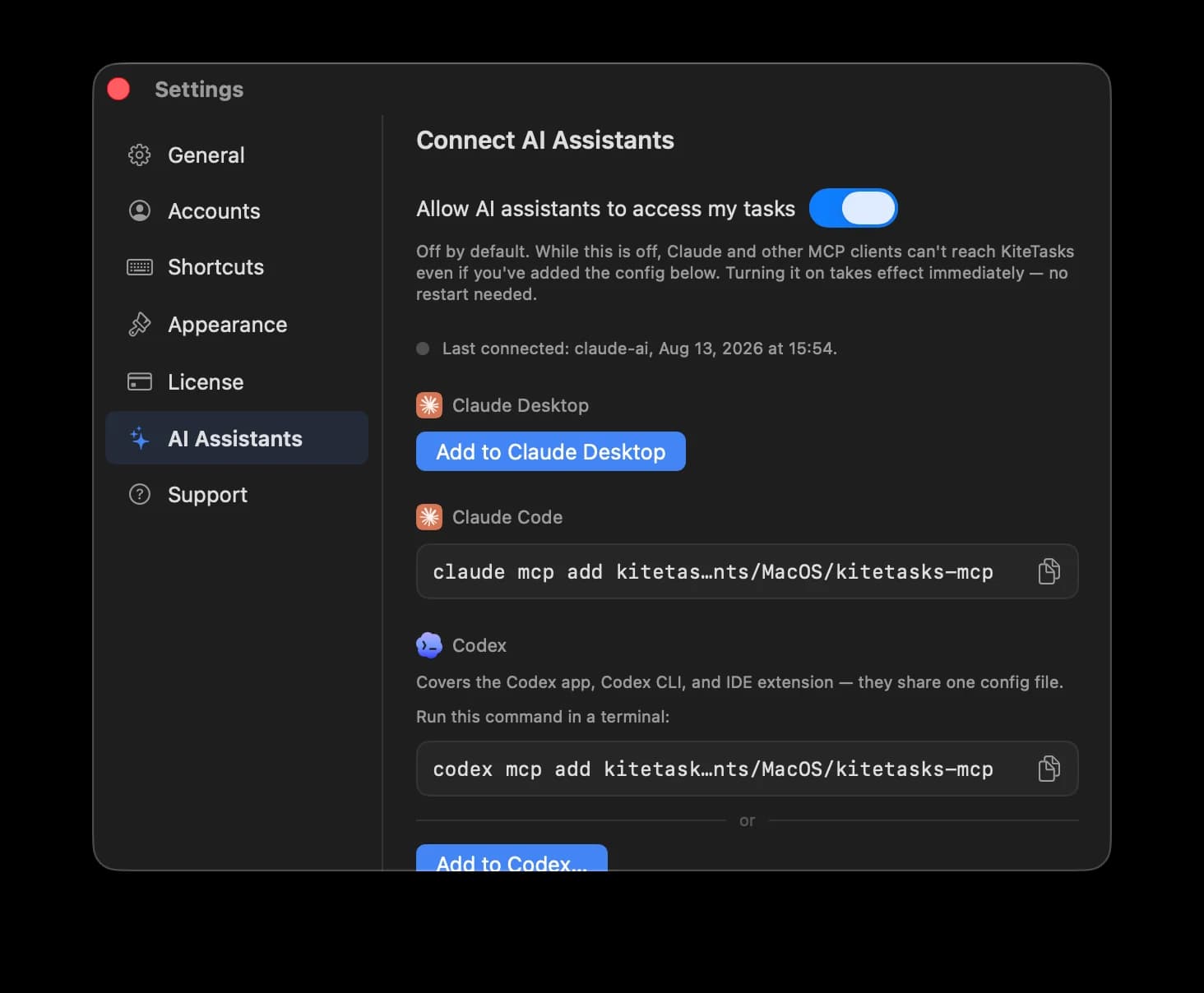
- 1Install KiteTasks from the Mac App Store and sign in with one or more Google accounts
- 2Open Settings with Cmd+, and choose AI Assistants
- 3Turn on "Allow AI assistants to access my tasks"
- 4Connect your client: one click for Claude Desktop or Codex, or copy the one-line command shown for Claude Code and other clients
- 5Ask your assistant something that needs your tasks — "What is due today?" is a good first test
| Tool | What it does |
|---|---|
| list_accounts | Lists the Google accounts signed in to KiteTasks and which one is active |
| list_task_lists | Lists an account's task lists with their ids and titles |
| list_tasks | Lists open (and optionally completed) tasks from one list or from every list |
| search_tasks | Finds tasks by matching text against titles and notes across all lists |
| create_task | Creates a task with optional notes, due date, time, list, and parent |
| update_task | Changes a task's title, notes, due date, or status without touching other fields |
| complete_task | Marks a task done, completing its open subtasks the way the app does |
| delete_task | Permanently deletes a task and its subtasks |
| move_task | Reparents, reorders, or moves a task to another list |
| create_task_list | Creates a new, empty task list |
| rename_task_list | Renames an existing task list |
Every tool works across all the Google accounts added to the app, which is the one thing no single-credential open-source server can do. Due dates, notes, subtasks, and list membership round-trip through the same sync the app itself uses, so anything the assistant changes shows up in Google Tasks on the web, in Gmail, and on your phone within moments.
Which clients can connect
Anything that supports local stdio MCP servers. Claude Desktop installs it in one click from the AI Assistants pane. Claude Code takes a single command, claude mcp add kitetasks followed by the path to the helper, which the pane shows with a copy button. Codex — the agent surface inside the ChatGPT desktop app, plus the Codex CLI and IDE extension, which share one config — connects in one click or with codex mcp add. Gemini CLI and Cursor point at the same helper through their own local-server settings: the executable lives at /Applications/KiteTasks.app/Contents/MacOS/kitetasks-mcp. The exceptions are the pure-cloud surfaces: ChatGPT's chat connectors and the consumer Gemini app only take remote servers, so they cannot reach anything running on your Mac.
How the local architecture works
The MCP client launches a small helper binary shipped inside the KiteTasks app bundle. That helper speaks MCP to the client over standard input and output, and hands each request to the KiteTasks app — launching it if it is not already open — which already holds your Google OAuth session and its local task cache. No port is opened, no server is left running when the client is closed, and turning the toggle off in Settings cuts every client off at once. Because the app talks to Google directly with the same OAuth 2.0 sign-in Google's own apps use, there is no new party in the chain — the trust model is identical to using the app by hand.
Once connected
What to ask once the server is connected
The server is only as useful as the questions you put to it. These work with any client — Claude, Codex, Gemini CLI — because they all end up calling the same eleven tools. Copy one and adjust the list names to yours.
Look at the tasks in my Inbox list. Move anything that is clearly work to my Work list and anything personal to Personal, and tell me what you were unsure about.
Using my Google Tasks, write a three-line standup: what I completed yesterday, what is due today, and anything overdue I should mention.
Create a new task list called "Kitchen renovation" and add the first six tasks a homeowner should handle, with due dates spread across the next month.
I am travelling from Monday to Wednesday next week. Find every task due on those days across my lists and move each one to the following Thursday.
Because every change goes through the official Google Tasks API, tasks the assistant creates or moves appear in Google Tasks on the web, in Gmail's side panel, and on your phone like any other edit.
Frequently asked
- What is a Google Tasks MCP server?
- It is a program that connects AI assistants to Google Tasks using the Model Context Protocol, an open standard for giving an AI client tools it can call. The server exposes operations such as listing, searching, creating, completing, and moving tasks; the client — Claude, Codex, Cursor, Gemini CLI — decides when to call them based on what you ask. The server can run on your own machine, in a hosting platform's cloud, or inside a desktop app like KiteTasks.
- Is there an official Google Tasks MCP server from Google?
- No. Google's official Workspace MCP servers cover Gmail, Drive, Docs, Sheets, Slides, Calendar, Chat, and the People API, and Google Tasks is not on the list. Every Google Tasks MCP server available today is third-party: an open-source project you host with your own Google Cloud OAuth credentials, a hosted platform such as Composio or Zapier MCP, or the local server built into KiteTasks.
- Is there a built-in Google Tasks connector for Claude or ChatGPT?
- No. Claude's first-party Google connectors cover Gmail, Google Calendar, and Google Drive, and ChatGPT's built-in Google apps cover Gmail, Google Calendar, Google Contacts, and Google Drive. Google Tasks is missing from both, so every Google Tasks connector is really a third-party MCP server: a hosted platform's server URL added as a custom connector, an open-source server you run yourself, or a local server like the one built into KiteTasks.
- Which AI clients can connect to a Google Tasks MCP server?
- For a local server: Claude Desktop, Claude Code, Codex (in the ChatGPT desktop app, the CLI, and the IDE extension), Gemini CLI, Cursor, and any other client that supports stdio MCP servers. For a hosted server: those same clients plus cloud-only surfaces such as ChatGPT's chat connectors, which only accept a remote URL. KiteTasks' built-in server is local, with one-click setup for Claude Desktop and Codex and a one-line command for everything else.
- Does Google Tasks MCP work with Gemini?
- With Gemini CLI, yes — it supports local stdio servers through gemini mcp add or an entry in its settings file, so it can point at KiteTasks' helper or at an open-source server you run. The consumer Gemini app is different: its connected-apps list is curated by Google and does not accept an arbitrary local server, so there is no general way to give gemini.google.com access to a Google Tasks MCP server today.
- What can an AI assistant actually do in Google Tasks over MCP?
- It depends on the server. The smallest open-source servers offer six tools — search, list, create, update, delete, and clear completed. Fuller ones add task-list management and moving tasks between lists. KiteTasks exposes eleven tools: list accounts, list task lists, list tasks, search tasks, create, update, complete, delete, and move tasks, and create and rename task lists — across every Google account signed in to the app.
- Is a hosted Google Tasks MCP server safe to use?
- It is safe in the sense that reputable platforms handle OAuth correctly, but it changes who has access: the platform's cloud holds a standing refresh token for your Google account and every task passes through its servers. A local server avoids that entirely. KiteTasks' server runs only on your Mac, is off by default, reuses the app's own sign-in, and can be switched off in Settings at any time — no new party ever gains access to your Google account.