How to Use Google Tasks on a Mac
Arturo4 min read
The short answer
Google does not make a Mac app for Google Tasks, and Apple Reminders cannot sync with it either. On a Mac you have three realistic options: add tasks.google.com to your Dock as a web app using Safari or Chrome, keep tasks in the side panel inside Gmail and Google Calendar, or use a dedicated native Mac app like KiteTasks. Here is how each option works and where each one falls short.
Option 1 · Nothing to install
Add tasks.google.com to your Dock as a web app
Since macOS Sonoma, Safari can turn any website into a standalone web app that lives in your Dock. Applied to tasks.google.com, this gets you a dedicated Google Tasks window on your Mac without installing anything, and without keeping a browser tab open.
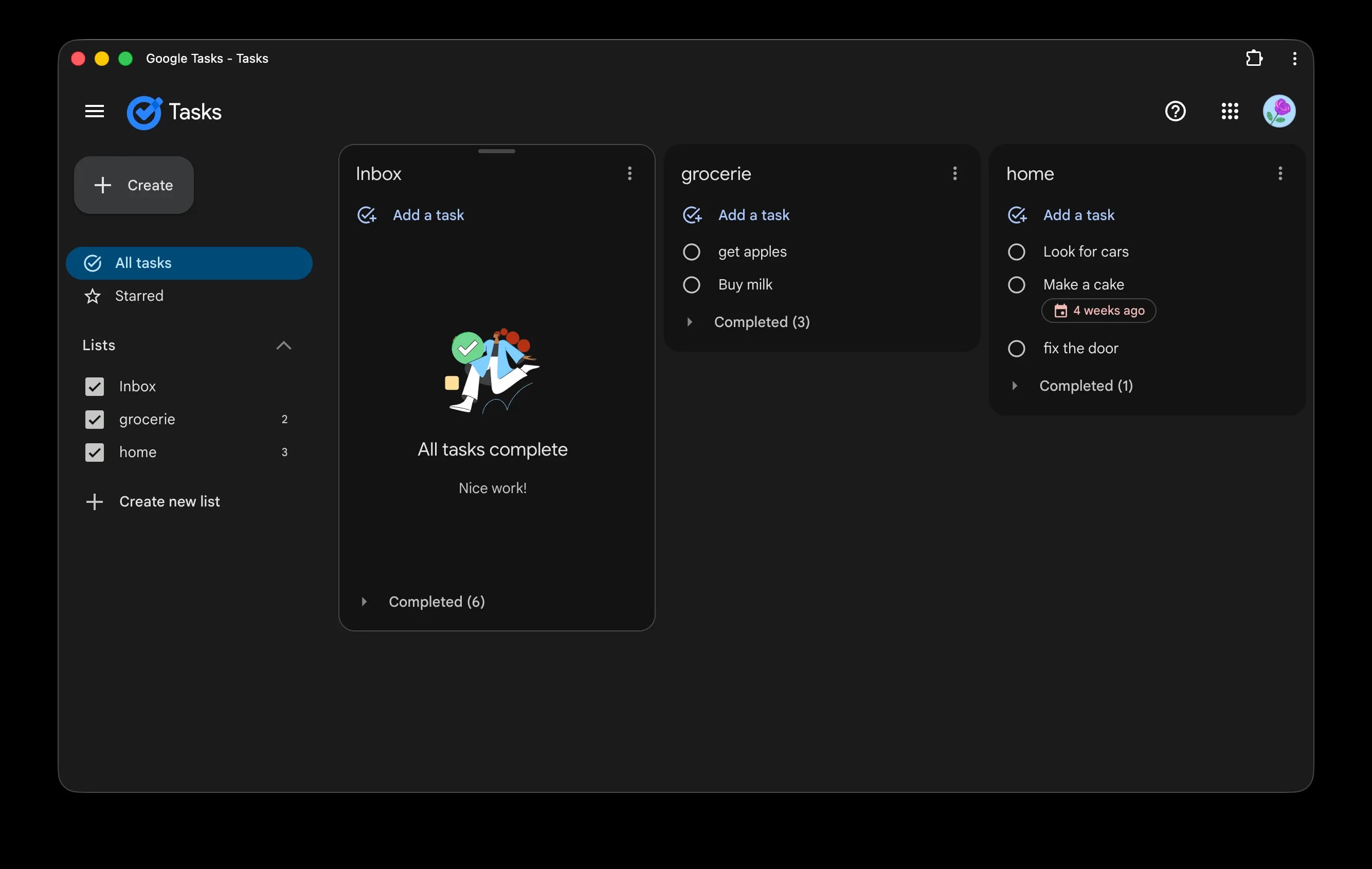
- 1Open Safari (macOS Sonoma or later) and go to https://tasks.google.com
- 2Sign in with your Google account if you are not already signed in
- 3Choose File → Add to Dock from the menu bar
- 4Rename the app to "Google Tasks" if you like, then click Add
- 5Launch it from your Dock. It opens in its own window, separate from Safari, and behaves like a lightweight app
If you prefer Chrome or Edge, the same idea works through their install button on the right side of the address bar, which sets up tasks.google.com as a Progressive Web App. Either way, the limits are the same because it is still the Google Tasks web app underneath: no menu bar presence, no system-wide keyboard shortcut for capturing a task, no full-text search across lists, and switching Google accounts means switching browser profiles.
Use the Tasks side panel in Gmail and Google Calendar
If most of your tasks start life as emails, you may not need a separate window at all. Gmail and Google Calendar both include a Tasks side panel on the right edge of the screen. Click the Tasks icon to open it, and use "Add to tasks" on any email to turn it into a task that stays linked to the original message. The trade-off is that the side panel shows one list at a time in a narrow column, so it works as a companion, not as your main view.
What about syncing with Apple Reminders?
This is the first thing many Mac users try, and it does not work out of the box. Adding your Google account in System Settings syncs Mail, Calendar, Contacts, and Notes, but Google Tasks is not part of that integration. Apple Reminders and Google Tasks are separate systems with no official bridge in either direction, so if your tasks live in Google Tasks you need one of the options on this page. Third-party apps can close this gap, and Apple Reminders sync is coming to KiteTasks in an upcoming release.
Option 2 · Native Mac app
Use a native Mac app with KiteTasks
KiteTasks is a native macOS app that connects to your Google Tasks data over the official Google Tasks API using OAuth 2.0. It is not an Electron wrapper and not a web view. It runs natively on Apple Silicon and integrates with the parts of macOS the web app cannot reach: the menu bar, Notification Center, and system-wide keyboard shortcuts.
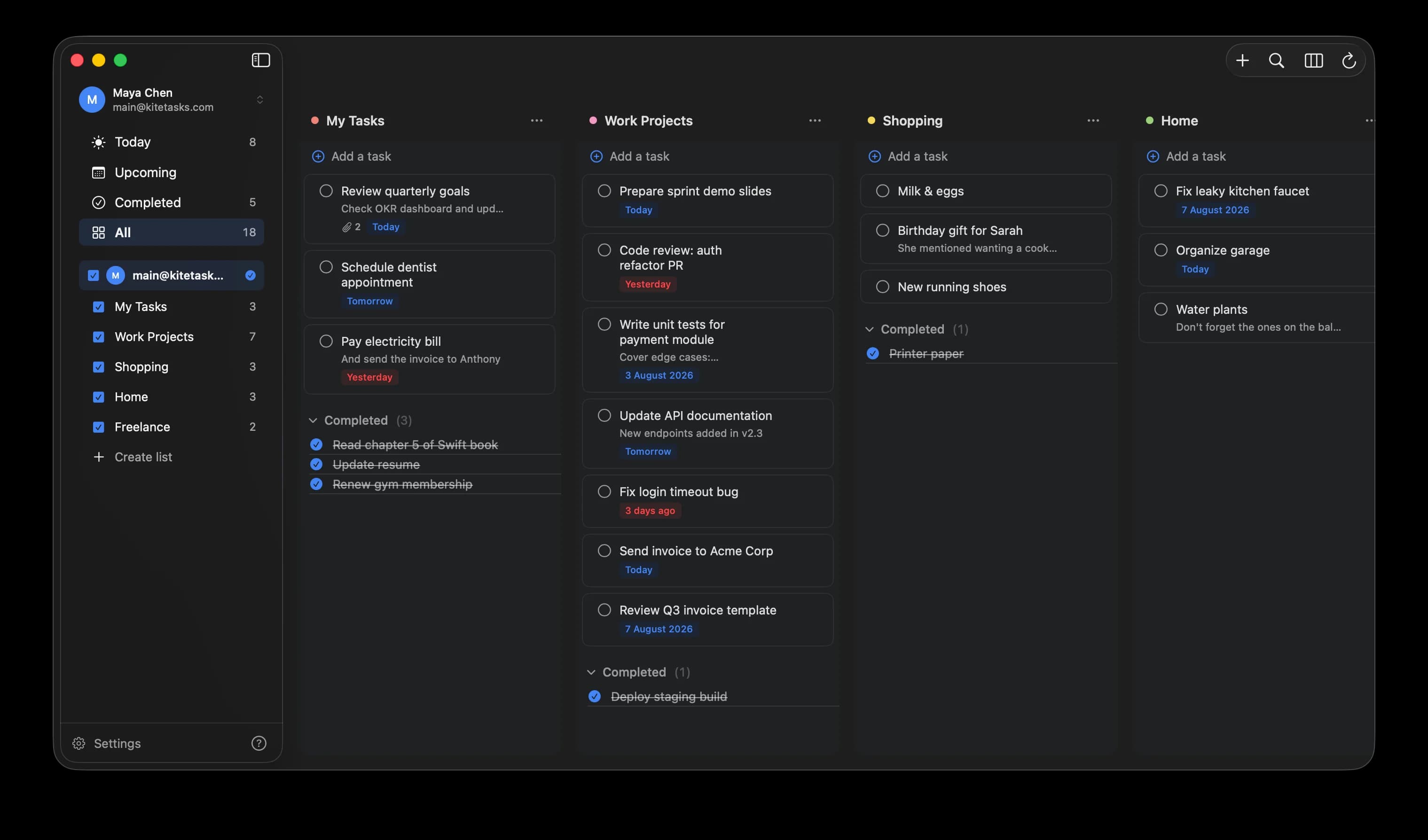
- 1Download KiteTasks from the Mac App Store
- 2Open the app and sign in with your Google account using OAuth 2.0, the same authentication flow Google's own apps use
- 3Your existing lists and tasks sync automatically in both directions
What the native app adds on a Mac: a system-wide Quick Capture shortcut you can press from inside any app, full-text search across every list including completed tasks, a Today view that gathers work from all lists, an Upcoming view that overlays your Google Calendar events, natural-language date parsing like "call mom tomorrow 3pm", one-click switching between multiple Google accounts, and reminders delivered through Notification Center like any other Mac app. No subscription and no telemetry inside the app.
Frequently asked
- Is there an official Google Tasks app for Mac?
- No. Google has not released a Google Tasks app for macOS or any other desktop operating system. The closest official option is tasks.google.com, which you can add to your Dock as a web app with Safari or install as a Progressive Web App with Chrome or Edge. KiteTasks is a third-party native Mac app that connects to your Google Tasks data using the official Google Tasks API and OAuth 2.0.
- Can I sync Google Tasks with Apple Reminders?
- Not with anything Apple or Google ship. Adding a Google account to macOS in System Settings syncs Mail, Calendar, Contacts, and Notes, but not Google Tasks, and there is no official bridge between Google Tasks and Apple Reminders in either direction. Apple Reminders sync is coming to KiteTasks in an upcoming release, which will let you see and manage both systems from one native Mac app.
- Does Google Tasks have a Mac menu bar app?
- Not from Google. The web app and the Dock web app cannot place anything in the macOS menu bar. Native third-party apps can: KiteTasks lives in the menu bar, so your tasks are one click away from any app, and its Quick Capture shortcut lets you add a task without switching windows at all.
- Do Google Tasks notifications work on a Mac?
- Only partially with the web app. Notifications from tasks.google.com depend on the browser being open and having notification permission, which makes them easy to miss. A native app registers directly with macOS Notification Center, so due-date reminders behave like reminders from any other Mac app, including on the lock screen and in Focus modes you allow.
Related guides
- How to Add Google Tasks to Your Desktop
- How to Search Google Tasks
- How to Get a Google Tasks Widget on Your Mac
- How to Add a Google Tasks Widget on iPhone
- Google Tasks Keyboard Shortcuts: The Complete List
- How to Connect Google Tasks to Claude (MCP)
- How to Connect Google Tasks to ChatGPT and Codex (MCP)
- Google Tasks MCP Server: Every Way to Connect AI to Google Tasks