Google Tasks vs Google Keep: Which One Should You Use?
Fruzsina10 min read
The short answer
Use Google Tasks for anything with a date: it puts the task on your Google Calendar and can repeat it. Use Google Keep for notes, ideas and checklists, especially the ones you share with someone. Most people use both, and since October 2025 the two are connected: a reminder you add to a Keep note is saved as a task in Google Tasks.
One list, two apps
The same list in both apps
The quickest way to see the difference is to put one list in each app. Here is a trip to Lisbon, planned twice.
 Keep
- Renew passport
- Pack
- Charger
- Travel adapter
- Check in online
- Cafés Ana recommended
- Book flights
 Tasks
- Renew passportFri, Nov 20
- PackThu, Dec 3
- Charger
- Travel adapter
- Check in onlineFri, Dec 4, 9:00 AM
- Water the plantsWeekly
In Keep, the list is one note. Its color, its label and the people it's shared with belong to the whole note, and so does a reminder, if you add one. In Google Tasks, every line is a task of its own, so every line can have its own date, and the dated ones show up on your Google Calendar.
Google Tasks
What Google Tasks is for
Google Tasks is the to-do list in your Google account. A task is short: a title, details if you need them, and a date and time if it has one. That date is what Tasks is for. It puts the task on your Google Calendar and gets you a notification when it's due.
From KeepDates that land on your calendar
A task with a date appears on your Google Calendar, and you can create, change and complete tasks there too. With a time, the notification comes at that time; without one, at 9 AM. A task without a date stays in your list and never reaches the calendar.
Repeating tasks
A task can repeat every so many days, weeks, months or years: forever, until a date, or a set number of times. Rent on the 1st of every month is one task, not twelve. Subtasks and shared tasks can't repeat, and neither can a task that has subtasks.
Subtasks, one level deep
Break a task into subtasks from its Task options menu. Google allows one level: a subtask can't have subtasks of its own.
From Gmail, and from the side panel
In Gmail, Add to Tasks turns an email into a task. Tasks also opens in the side panel of Gmail, Calendar, Chat, Drive, Docs, Sheets and Slides, and as the Google Tasks app on Android and iPhone. Star the tasks that matter most to see them together under Starred tasks.
Tasks keeps the rest plain: you organize with lists and stars, and a list stays yours alone, because Google Tasks has no option to share one. Google's help covers assigning single tasks instead.
Google Keep
What Google Keep is for
Google Keep is Google's notes app. A note can be a few lines of text or a checklist, with a photo, a sketch or an audio recording in it, and you can share it. Notes have no due dates. A note can have a reminder, and Keep now saves that reminder to Google Tasks (more on that below).
KeepSearchA- Notes
- Reminders
- Travel
- Recipes
- Ideas
- Edit labels
- Archive
- Trash
- Renew passport
- Pack
- Check in online
- Oat milk
- Lemons
- Coffee beans
- Rice
- The novel from Ana's book club
- That history of maps
- Something short for the flight
- A good espresso cup
- The scarf from the market
Ideas without a date
Keep suits what you want to hold on to but haven't scheduled: books to read, gift ideas, a recipe, a packing list for a trip that's months away. Click Take a note and start typing; nothing asks you for a date.
More than text: photos, sketches and audio
A note can hold images, drawings and audio recordings next to its text. Turn any note into a checklist with Show checkboxes, and drag an item to the right to indent it. The first item in a list can't be indented.
Labels, colors and pins
Sort notes with up to 50 labels, a color or background for each note, and pins that keep a note at the top. They're personal: on a note you share, only you see your labels, colors and pins.
Keep also opens in the side panel of Gmail, Calendar, Chat, Drive, Docs, Sheets and Slides, and from there you can drag a note into a doc or a presentation.
Side by side
Google Tasks vs Google Keep, feature by feature
The two apps compared on what decides where a to-do belongs, as Google's help pages describe them.
Built for
- Google Tasks
- To-dos, especially ones with a date
- Google Keep
- Notes, ideas and lists
Dates and repeats
- Google Tasks
- A date and time on each task, repeating daily, weekly, monthly or yearly
- Google Keep
- A reminder on the whole note, with a date, a time and a repeat
Reminders
- Google Tasks
- A notification at the task's date and time, or at 9 AM if it has no time
- Google Keep
- Saved as a task in Google Tasks; the Tasks or Calendar app sends the notification. No more location reminders
On Google Calendar
- Google Tasks
- Every task with a date
- Google Keep
- Its reminders, as tasks marked “From Keep” in their details
Nesting
- Google Tasks
- One level of subtasks
- Google Keep
- Indented checklist items
What it holds
- Google Tasks
- A title, details and a date
- Google Keep
- Text or a checklist, with images, drawings and audio recordings
Organizing
- Google Tasks
- Lists and stars
- Google Keep
- Up to 50 labels, note colors and pins, seen only by you
Sharing
- Google Tasks
- No list sharing. Single tasks can be assigned in a Chat space, or in a Google Doc on an eligible work or school account
- Google Keep
- Collaborators who can edit the note, or your whole family group
Side panel
- Google Tasks
- Gmail, Calendar, Chat, Drive, Docs, Sheets and Slides
- Google Keep
- The same apps, and you can drag a note into a doc
Phone apps
- Google Tasks
- Android and iPhone (iOS 17 or later)
- Google Keep
- Android and iPhone (iOS 18 or later)
Mac app from Google
- Google Tasks
- None: tasks.google.com in a browser
- Google Keep
- None: keep.google.com in a browser
Price
- Google Tasks
- Free
- Google Keep
- Free
Checked against Google's help pages and App Store listings on 11 November 2026. Google changes both apps often, so a row may drift; tell us if one has.
Which one?
Which one should I use?
Ask one question: does it have a date? If it does, it's a task. If it's something to remember, collect or share, it's a note. Some things are both.
- Groceries with your partnerGoogle Keep
- Rent on the 1st, every monthGoogle Tasks
- Books to read somedayGoogle Keep
- Reply to an email by FridayGoogle Tasks
- Planning a tripBoth, together
| What you're keeping track of | Use |
|---|---|
| Groceries with your partner | Google Keep, as a shared list you both edit |
| Rent, due on the 1st of every month | Google Tasks, as one task that repeats monthly |
| Books to read someday | Google Keep, as a note with no date |
| Replying to an email by Friday | Google Tasks: Add to Tasks from Gmail, with Friday as the date |
| Planning a trip | Both: ideas, photos and the packing list in Keep, the dated steps in Tasks |
Keep + Tasks
Using both together
Since October 2025, the two apps share one thing: reminders. Google began saving Keep reminders to Google Tasks in a rollout that started on 13 October 2025, for personal Google accounts and Google Workspace alike, and moved existing date and time reminders over as well.
That gives you a simple way to use both: capture in Keep, and when an idea gets a date, add a reminder to the note. It becomes a task on your calendar, and the note stays in Keep with everything in it.
- Google KeepGift ideas for MarcoReminder: Dec 2, 12:00 PM
- Google TasksGift ideas for MarcoWed, Dec 2, 12:00 PM
- Google CalendarGift ideas for MarcoWednesday, 12:00 PMFrom Keep
Add a reminder in Keep, get a task in Tasks
Open a note, click Remind me, pick a date, a time and a repeat if you want one, then Save. Google saves the reminder as a task: it shows in Google Tasks and on Google Calendar, and its task details say “From Keep”. Click that to get back to the note.
What you can change, and where
Change the date and time from the Keep note, or from the task in Tasks or Calendar. The title is different: change it in Tasks or Calendar, because editing the note's title doesn't update the task. Mark it complete from the note, from Tasks or Calendar, or from the notification on your phone.
Deleting and archiving
Delete the task in Tasks or Calendar and the note stays. Archive the note and the task isn't affected.
Notifications come from Tasks or Calendar
Keep no longer sends reminder notifications. On a phone, install the Google Tasks or Google Calendar app and allow its notifications. If you have both, the notification comes from Google Tasks.
Location reminders and old reminders
Location reminders are gone: Keep can no longer create or deliver them, and the place an old one used is kept in its task's description. Reminders that didn't repeat and were more than a year old went into a list named “Old Google Keep Reminders”. On a work or school account, reminders only moved if the organization had the Tasks service turned on. All of this is on Google's page about the change.
On a Mac
 If your to-dos live in Google Tasks
Once you've settled where your to-dos go, a Mac leaves one gap: Google makes no Mac app for Google Tasks, or for Google Keep. Both are on Android and iPhone; on a Mac you get tasks.google.com and keep.google.com in a browser, or the side panel in Gmail and Calendar.
KiteTasks is a native Mac app for Google Tasks. It signs in to your Google account and works with your Google Tasks lists. It doesn't read or edit Keep notes.
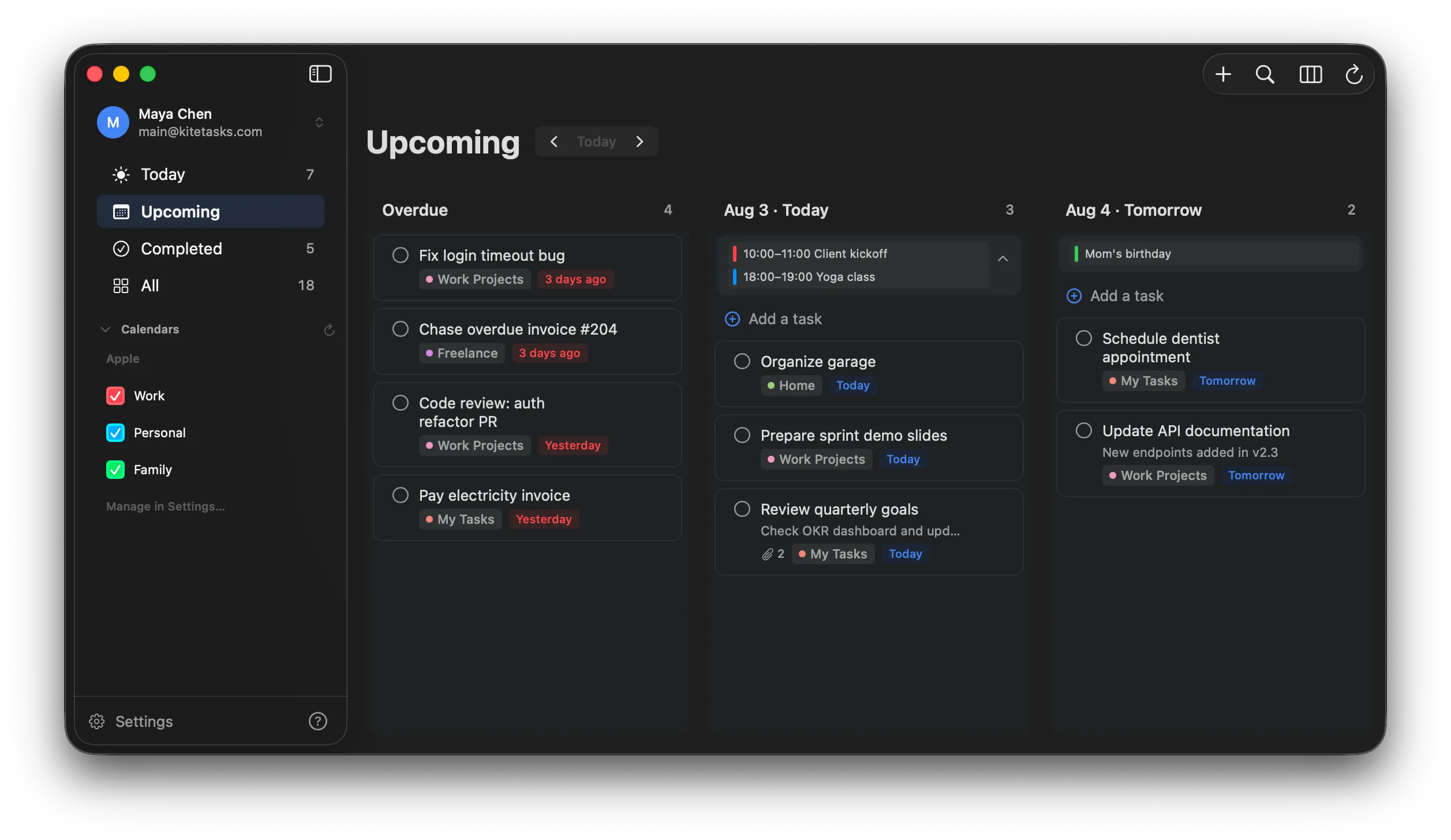
- A real Mac window and a menu bar icon, with a Today view, an Upcoming view and full-text search across every list, completed tasks included.
- Quick Capture from any app: type “call mom tomorrow 3pm” and KiteTasks sets the date and time for you.
- Widgets for your desktop and Notification Center: Today, List, Calendar, Month and Month grid. Tick a task off right in the Today or List widget.
- A built-in MCP server, off by default and running on your Mac, so Claude, ChatGPT and Codex can work with your Google Tasks.
7-day free trial. Requires macOS Sequoia 15.6 or later.
KiteTasks for iPhone is in open beta through TestFlight.
Need to share a list with someone? Google Tasks can't share one, and KiteTasks can't yet either: shared lists are in development. How to share Google Tasks covers what works today, including a shared Keep list.
Questions about Google Tasks and Google Keep
- Is Google Keep the same as Google Tasks?
- No. They're two separate Google apps. Google Tasks is a to-do list: tasks with dates, times, repeats and one level of subtasks, shown on Google Calendar. Google Keep is a notes app: text and checklists with images, drawings and audio recordings, labels and colors, shared with collaborators. Since October 2025 they're connected by reminders: a reminder on a Keep note is saved as a task in Google Tasks.
- Should I use Google Keep or Google Tasks?
- Use Google Tasks for anything with a date, because the date puts it on your Google Calendar and it can repeat. Use Google Keep for notes, ideas and checklists, especially ones you share. Most people use both: Keep for trip ideas and the shared grocery list, Tasks for the rent and the deadlines.
- Can Google Keep sync with Google Tasks?
- Through reminders. Since October 2025, a reminder you add to a Keep note is saved as a task in Google Tasks and shows on Google Calendar, with “From Keep” in its task details. You can change its date and time from Keep, Tasks or Calendar, and its title from Tasks or Calendar. The note itself, with its checklist, stays in Keep.
- Why are my Google Keep reminders in Google Tasks?
- Because Google moved them there. Starting in October 2025, Google saves Keep reminders as tasks in Google Tasks, and it moved existing date and time reminders over too, for personal and work or school accounts. Look for “From Keep” in a task's details to find the ones that came from Keep, and click it to open the note.
- Why doesn't Google Keep send reminder notifications anymore?
- Keep no longer sends them: Google Tasks or Google Calendar does. On a phone, install the Google Tasks or Google Calendar app and allow its notifications. If you have both, the notification comes from Google Tasks.
- What happened to location reminders in Google Keep?
- They're gone. Keep can no longer create or deliver reminders based on a place, now that reminders are saved to Google Tasks. If you had one, the location it used is kept in the task's description, which you can read in the Google Tasks app.
- Where did my old Google Keep reminders go?
- Reminders that didn't repeat and were more than a year old went into a Google Tasks list named “Old Google Keep Reminders”. Open tasks from the last 365 days are under Pending tasks, in the All-day section of today in Google Calendar.
- Can Google Keep notes have due dates?
- Not on their own. A note can have a reminder with a date, a time and a repeat, and that reminder is saved as a task in Google Tasks. The reminder belongs to the whole note, not to each item on its checklist. For a date on every step, use Google Tasks.
- Does Google Tasks have subtasks?
- Yes, one level: a task can have subtasks, but a subtask can't have subtasks of its own, and a task with subtasks can't repeat. The closest thing in Google Keep is indenting an item on a checklist.
- Can you share a Google Tasks list like a Keep note?
- No. Google Tasks has no option to share a list. You can assign single tasks in a Google Chat space, or from a Google Doc on an eligible work or school account. For a list several people edit, share a Google Keep list with collaborators or with your family group. KiteTasks can't share lists yet either: shared lists are in development.
- Is there a Google Keep or Google Tasks app for Mac?
- Not from Google. Both apps are on Android and iPhone, and on a Mac you use them in a browser at keep.google.com and tasks.google.com, or in the side panel of Gmail and Google Calendar. KiteTasks is a native Mac app for Google Tasks on the Mac App Store. It works with Google Tasks only, not with Keep notes.
Related guides
If this page answered your question, you can set kitetasks.com as a preferred source in Google Search, so our guides show up more often in your results.