Google Tasks vs Todoist: Which One Should You Use?
Fruzsina12 min read
The short answer
Pick Todoist if you need projects, priorities, labels and filters, or want to share projects with other people, and you're happy to pay $5 a month, billed yearly, for the full set. Stay with Google Tasks if your to-dos start in Gmail and belong on Google Calendar, and you want it free. Its biggest gap, no Mac app, is one you can fill without switching.
One list, two apps
The same list in both apps
The quickest way to see the difference is to put one list in each app. Here are the same household to-dos, kept twice.

 Todoist
- Pay rentDec 1online
- Renew car insuranceYesterdayonline
- Pick up dry cleaningToday
- Return library books
- Find the third one
- Check under the sofa
 Tasks
- Pay rentTue, Dec 1
- Renew car insuranceYesterday
- Pick up dry cleaningToday
- Return library books
- Find the third one
Todoist gives you more ways to sort the same things: sections inside a project, a priority on every task, labels that cut across projects, and steps inside steps. Google Tasks keeps it plain: one list, and on each task a date, a repeat, a star and one level of subtasks. Its dated tasks show up on your Google Calendar without any setup.
Projects, sections and labels
In Todoist, each list is a project, and a project can be split into sections. Labels cut across projects: tag tasks anywhere with a label such as “online” and see them together. The free Beginner plan allows 5 personal projects and Pro allows 300 (Todoist's usage limits). Google Tasks has lists, and a task belongs to one of them.
Priorities and filters
Todoist has four priority levels, p1 to p4, colored red, orange and blue, with p4 left plain, and you can't rename them. Filters are saved views that gather tasks from every project by date, priority, label and more: 3 on the free plan, 150 on Pro. Google Tasks has neither. You can star important tasks and see them together in the Starred list, sorted by date or by when you starred them.
Subtasks: four levels or one
Todoist nests sub-tasks four levels deep, and a repeating task can reset its sub-tasks each time. Google Tasks allows one level: a subtask can't have subtasks of its own (a limit Google set in 2018), and a task with subtasks can't repeat.
Adding a task
Adding a task: typing vs picking
Typing dates in plain words is Todoist's best-known feature. In Quick Add you write the task as a sentence, and Todoist picks out the date, the project (after #), the priority (p1 to p3) and the labels (after %) as you type.
Todoist · Quick AddPay rent every month starting Dec 1 #Home /Bills p1 %online
Description
Google Tasks · Add a taskRepeats work the same way: “every other week”, “every last workday at 3pm”, or “every! 3 months”, where the exclamation mark counts from the day you complete the task instead of its due date (Todoist's recurring dates). Labels used to take @, which still works but is due to be retired by the end of 2026.
Google Tasks takes the title as you type it. The date, the time and the repeat come from its picker: every so many days, weeks, months or years, forever, until a date, or a set number of times. It takes a few more clicks.
Gmail and Calendar
Gmail and Google Calendar
Here the two apps start from different places. Google Tasks is part of Google: it's built into Gmail and Google Calendar, with nothing to install or connect. Todoist connects to both, through an add-on for Gmail and an integration for Calendar, and each has limits worth knowing.
Add to Tasks in Gmail
Open an email and click Add to Tasks, or drag the email into the Tasks side panel. A task made from an email takes you back to the original message, so the details stay one click away.
Dated tasks on Google Calendar
Every task with a date appears on your Google Calendar, and you can create, change and complete tasks there too. With a time, the notification comes at that time; without one, at 9 AM.
Todoist for Gmail
Todoist's Gmail add-on works on every plan. Install it from the Google Workspace Marketplace, open an email, click the Todoist icon and add the email as a task, choosing its project, date, priority and label as you go. The link back to the email opens Gmail in a browser, not the Gmail app on iPhone or Android, and in a shared project only you can open it.
Todoist and Google Calendar
Todoist's Calendar integration also works on every plan. It shows your Google Calendar events in Todoist's Today and Upcoming views, read-only, and can put your tasks on Google Calendar in a separate calendar named Todoist: tasks with a date, a time and a duration, plus date-only tasks if you turn on Sync all-day tasks. Rename or reschedule one there and the task follows; a new event in that calendar doesn't become a task. The free plan connects one calendar account, Pro up to three.
Neither of them touches Google Tasks. Todoist's own help page says so: only Google Calendar events sync with Todoist, Google Tasks don't. That's what the sync tools further down are for.
Side by side
Google Tasks vs Todoist, feature by feature
The two apps compared on what usually decides a switch, as Google's and Todoist's own pages describe them. Todoist's prices are its US prices.
Price
- Google Tasks
- Free
- Todoist
- Free Beginner plan; Pro is $5 a month billed yearly ($60), or $7 billed monthly
Free plan limits
- Google Tasks
- No paid version: everything is free
- Todoist
- 5 personal projects, 3 filters, 1 week of activity history, 5 MB files, no custom reminders
How you organize
- Google Tasks
- Lists, and a star on important tasks
- Todoist
- Projects with sections, labels and saved filters
Priorities
- Google Tasks
- None; a star marks what matters
- Todoist
- Four levels, p1 to p4
Subtasks
- Google Tasks
- One level
- Todoist
- Four levels
Type dates in plain words
- Google Tasks
- No: you pick the date, time and repeat
- Todoist
- Yes, in Quick Add: “tomorrow at 4 PM”, “every other week”
Repeats
- Google Tasks
- Every so many days, weeks, months or years; not on subtasks, or on tasks that have them
- Todoist
- Typed in plain words, from the due date or from when you finish (“every!”)
Reminders
- Google Tasks
- A notification at the task's time, or at 9 AM if it has none
- Todoist
- Automatic on every plan for tasks with a time; custom reminders on Pro
Gmail
- Google Tasks
- Built in: Add to Tasks, with a way back to the email
- Todoist
- Todoist for Gmail add-on; the task's link opens Gmail in a browser
Google Calendar
- Google Tasks
- Built in: tasks with a date show on your calendar
- Todoist
- An integration: your events, read-only, in Todoist; tasks in a separate Todoist calendar
Share a list
- Google Tasks
- No list sharing. Single tasks can be assigned in a Chat space, or in a Google Doc on an eligible work or school account
- Todoist
- Shared projects, up to 5 people on a personal project; team workspaces on Business
Mac and Windows apps
- Google Tasks
- None from Google: a browser or the side panel
- Todoist
- Yes, and Linux
Phone and watch apps
- Google Tasks
- Android, iPhone and iPad
- Todoist
- Android, iPhone, iPad, Apple Watch and Wear OS
Where your tasks live
- Google Tasks
- Your Google account
- Todoist
- A Todoist account, separate from Google
Checked against Google's and Todoist's help pages and Todoist's pricing page on 12 November 2026. Both apps change often, so a row may drift; tell us if one has.
Which one?
Which one should I use?
Start from what's missing. If it's structure, priorities or a project several people share, that's Todoist. If your to-dos come from Gmail and belong on your calendar, Google Tasks already does that, for free. And if all you miss is a Mac app, you can stay.
- Emails into to-dos, all dayGoogle Tasks
- Projects with other peopleTodoist
- Priorities and saved filtersTodoist
- A free list on your calendarGoogle Tasks
- Only leaving for a Mac app
 Stay, and add a Mac app
| What you need | Use |
|---|---|
| Turning emails into to-dos all day | Google Tasks: Add to Tasks in Gmail, with a way back to each email |
| Planning projects with other people | Todoist: a shared project, with assigned tasks and comments |
| Priorities and saved filters | Todoist: four priority levels, and filters across every project |
| A free list that shows on your calendar | Google Tasks: every task with a date appears on Google Calendar |
| Only leaving because there's no Mac app | Stay with Google Tasks and add a Mac app (see below) |
Tasks + Todoist
Using both: syncing Google Tasks with Todoist
Plenty of people don't want to choose. They like Add to Tasks in Gmail, but want to plan their week in Todoist. Todoist has no built-in way to do that: there's no Google Tasks sync or importer, and its Calendar integration says plainly that Google Tasks don't sync. Its CSV import takes a file in Todoist's own format, up to 300 tasks a project.
So it takes a third-party tool that signs in to both. What any of them can carry is limited by Google's Tasks API, which they all go through: it keeps a task's date but not its time, and has no field for repeats or stars. Google Tasks has nowhere to put Todoist's priorities and labels either.
Google TasksTodoist- The title
- Notes
- The due date
- Done or not done
- The time of day
- Repeats
- Stars
- Todoist's priorities and labels, on the Google side
- Subtasks
- The link back to the email
- Which way new tasks travel
IFTTT
IFTTT's applets each run one way, such as “Automatically add new tasks from Google Tasks to Todoist”, so syncing both ways takes one in each direction. On its free plan, IFTTT checks for new tasks about once an hour.
Pleexy
Pleexy sends new tasks from Google Tasks into Todoist, then syncs changes to the name and date, completions and deletions both ways. Tasks you create in Todoist stay in Todoist. It's paid, after a 14-day trial.
Zapier
Zapier's Zaps also run one way: a new or completed task in one app creates a task in the other, with a title, notes and a due date on the Google Tasks side. Its free plan runs two-step Zaps up to a monthly limit.
Whichever you try, start with a test list, and see how a repeating task and a task with subtasks come through before you connect everything.
On a Mac
If you stay with Google Tasks
Many people look at Todoist for one reason: Google makes no Mac app for Google Tasks. On a Mac you use it in a browser, at tasks.google.com or in Google Calendar, or in the side panel of Gmail. Todoist has its own apps for Mac, Windows, Linux, iPhone, iPad, Android, Apple Watch and Wear OS.
If a Mac app is all you're missing, you don't have to move. KiteTasks is a native Mac app for Google Tasks: it signs in to your Google account and works with the lists you already have, so Add to Tasks in Gmail and your tasks on Google Calendar carry on as before.
What it doesn't do: KiteTasks doesn't show priorities or labels, and its shared lists are in development. If you need those today, Todoist is the better pick.
- Todoist Pro
$60 a year
Billed yearly, that's $5 a month; billed monthly, $7 a month. The free Beginner plan has the limits in the table above.
- Google Tasks + KiteTasks
Free for 7 days
Google Tasks is free, and KiteTasks comes with a 7-day free trial. After it, KiteTasks continues as KiteTasks Pro, a paid plan.
US prices on 12 November 2026.
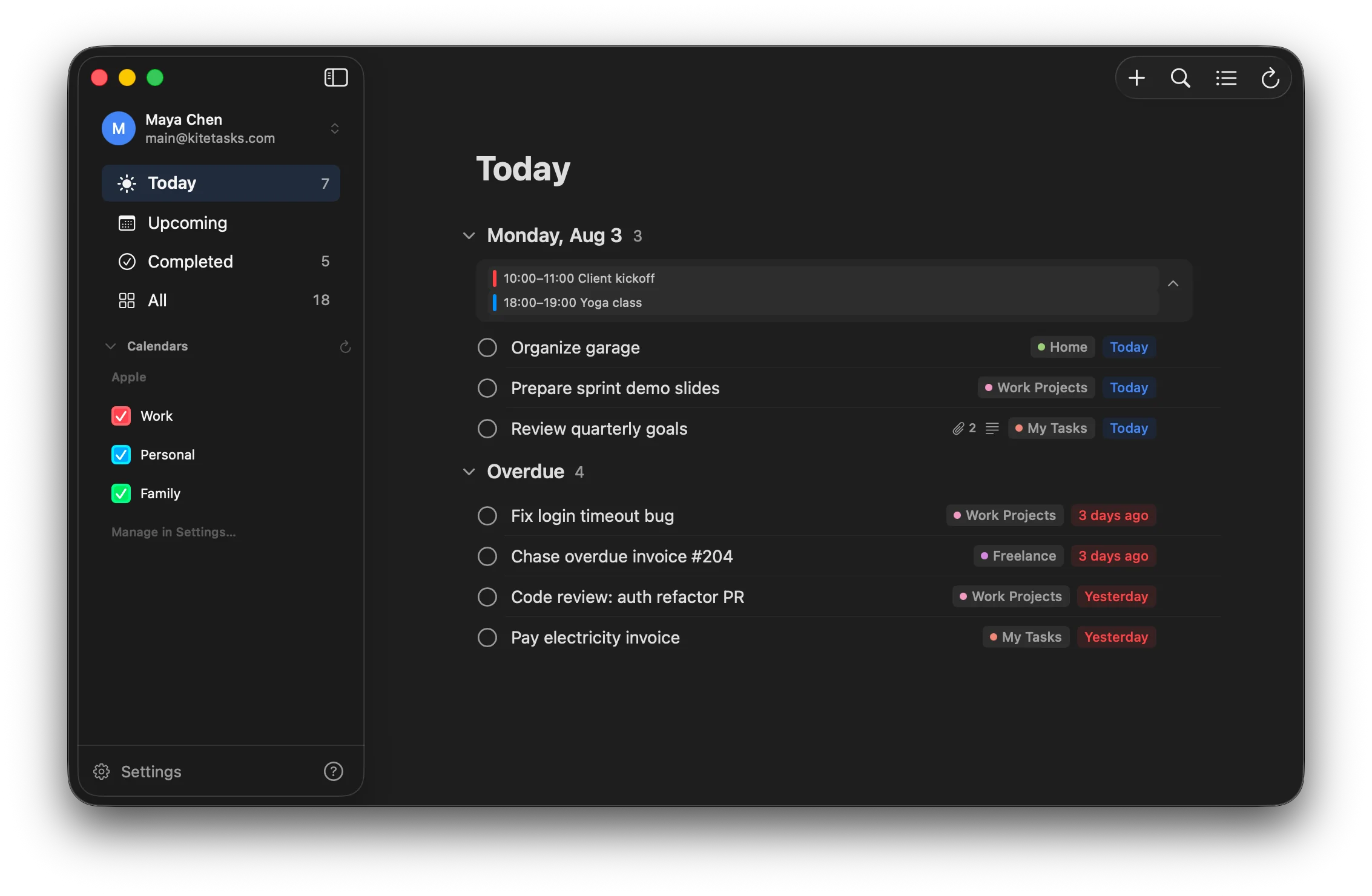
- A real Mac window and a menu bar icon, with a Today view, an Upcoming view and full-text search across every list, completed tasks included.
- Quick Capture from any app: type “call mom tomorrow 3pm” and KiteTasks sets the date and time for you.
- Widgets for your desktop and Notification Center: Today, List, Calendar, Month and Month grid. Tick a task off right in the Today or List widget.
- A built-in MCP server, off by default and running on your Mac, so Claude, ChatGPT and Codex can work with your Google Tasks.
7-day free trial. Requires macOS Sequoia 15.6 or later.
KiteTasks for iPhone is in open beta through TestFlight.
Need to share a list today? Google Tasks can't share one, and KiteTasks can't yet either: shared lists are in development. How to share Google Tasks covers what works now.
Questions about Google Tasks and Todoist
- Is Todoist better than Google Tasks?
- It does more. Todoist has projects with sections, four priority levels, labels, saved filters, sub-tasks four levels deep, shared projects and its own apps on every platform. Google Tasks is simpler, free, and built into Gmail and Google Calendar. Todoist is better if you need that structure or share projects with other people; Google Tasks is better if your to-dos start in Gmail and belong on your calendar.
- Is Todoist free?
- Yes, with limits. As of November 2026, the free Beginner plan allows 5 personal projects, 3 filters and 1 week of activity history, with no custom reminders. Todoist Pro is $5 a month billed yearly ($60 a year) or $7 billed monthly, and Business is $8 per user a month billed yearly or $10 billed monthly. Google Tasks is free.
- Can Todoist sync with Google Tasks?
- Not on its own. Todoist's Calendar integration syncs Google Calendar events, and its help page says Google Tasks don't sync. To connect the two you need a third-party tool such as IFTTT, Pleexy or Zapier. Through Google's Tasks API they can carry a task's title, notes, date and completion, but not its time, its repeat or its star, and Google Tasks has no place for Todoist's priorities and labels.
- Does Todoist work with Gmail and Google Calendar?
- Yes, on every plan. The Todoist for Gmail add-on turns an email into a task with a link back to it, which opens Gmail in a browser. The Calendar integration shows your Google Calendar events in Todoist, read-only, and can put your tasks on Google Calendar in a separate calendar named Todoist. Google Tasks needs neither: it's built into both.
- Can I import Google Tasks into Todoist?
- Not directly. Todoist has no importer for Google Tasks. Its CSV import takes a file in Todoist's own format, up to 300 tasks per project, so you would have to build that file yourself. The easier route is a sync tool such as IFTTT, Pleexy or Zapier, which copies new tasks across as they're added.
- Is there a Google Tasks app for Mac?
- Not from Google. Google Tasks has apps for Android, iPhone and iPad, and on a Mac you use it in a browser, at tasks.google.com or in Google Calendar, or in the side panel of Gmail. KiteTasks is a native Mac app for Google Tasks on the Mac App Store. It works with your existing Google Tasks lists, so you don't have to move to another to-do app to get one.
- Does Google Tasks have priorities?
- Not as levels. You can star important tasks and see them together in the Starred list, sorted by date or by when you starred them. Todoist has four priority levels, p1 to p4, and filters that can gather tasks by priority.
- Can you share a Google Tasks list like a Todoist project?
- No. Google Tasks has no option to share a list. You can assign single tasks in a Google Chat space, or from a Google Doc on an eligible work or school account. Todoist shares a personal project with up to 5 people on any plan. KiteTasks can't share lists yet either: shared lists are in development.
- Does Todoist have a Mac app?
- Yes. Todoist has its own apps for Mac, Windows, Linux, iPhone, iPad, Android, Apple Watch and Wear OS. Google makes no Mac or Windows app for Google Tasks.
- What do you lose when you sync Google Tasks with Todoist?
- Anything Google's Tasks API has no place for. Every sync tool goes through it, and it keeps a task's date but not its time, and has no field for repeats or stars. Todoist's priorities and labels have nowhere to go in Google Tasks. Subtasks and the link back to a Gmail message depend on the tool, so try one on a test list first.
Related guides
If this page answered your question, you can set kitetasks.com as a preferred source in Google Search, so our guides show up more often in your results.